Replace Google MediaPipe Entirely (C++)
MediaPipe4U provides pluggable algorithm connectors. Replace the built-in Google MediaPipe solver with your own algorithm or MediaPipe application, such as a Python server running MediaPipe.
Prerequisites
MediaPipe4U uses the BlazePose skeleton structure. Other structures such as SMPL and SMPLX do not work correctly.
A replacement algorithm must:
- Output a skeleton matching BlazePose.
- Use the same landmark coordinate systems as Google MediaPipe.
- Output Apple ARKit-compatible BlendShapes when expressions are included.
Tip
Landmark specifications must also match Google MediaPipe:
NormalizedLandmark
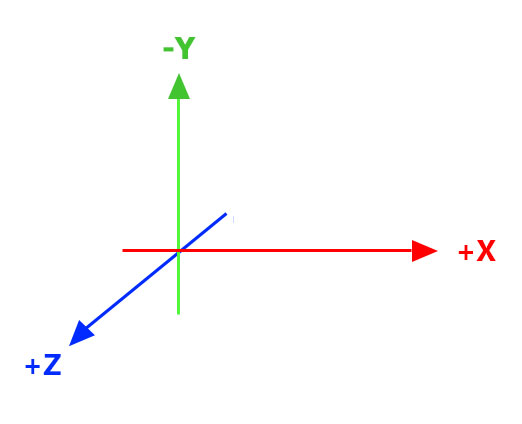
x, y, and z: real-world 3D coordinates in meters, with the origin centered between the hips.
Landmark
x and y: coordinates normalized to [0.0, 1.0] by image width and height; [0.0, 0.0] is the upper-left corner.
z: landmark depth relative to the midpoint of the hips. Smaller values are closer to the camera, using roughly the same scale as x.
MediaPipe4U uses NormalizedLandmark for
PoseWorldLandmarkand Landmark for all others.
Implementation Steps
To replace Google MediaPipe completely:
- Implement a custom Connector derived from
IMediaPipeHolisticConnector. - Provide a
UBlueprintFunctionLibrarythat callsStartCustomConnectororStartCustomConnectorAsynconUMediaPipeHolisticComponent. - In Blueprint, use the function from step 2 instead of
StartCamera,StartImageSource, and similar functions.
The following sections describe the details.
IMediaPipeHolisticConnector
IMediaPipeHolisticConnector defines the connection between Unreal Engine and the Google MediaPipe API.
Implement a derived C++ class to replace the built-in Connector.
class IMediaPipeHolisticConnector
{
public:
    static IMediaPipeHolisticConnector& Get();
    static IMediaPipeHolisticFeatureRegistry& GetFeatureRegistry();

    virtual bool ConfigureGraph(const MediaPipeGraphCnf& InConfig) const = 0;
    virtual void EnableFrameCallback(bool Enabled) = 0;

    virtual bool IsConnected(UObject* Owner) const = 0;
    virtual bool Connect(UObject* Owner) = 0;
    virtual bool Disconnect(const UObject* Owner) = 0;

    virtual bool StartPipeline(long long SessionId, IImageSource* ImageSource, const FMediaPipeHolisticOptions& Options) = 0;
    virtual void StopPipeline() = 0;
    virtual bool PushFrameToPipeline(TSharedRef<IMediaPipeTexture> InTexture,  int RotationDegrees) = 0;

    virtual FLandmarksOutputEvent& OnPoseLandmarksTrigger() = 0;
    virtual FLandmarksOutputEvent& OnPoseWorldLandmarksTrigger() = 0;
    virtual FLandmarksOutputEvent& OnLeftHandLandmarksTrigger() = 0;
    virtual FLandmarksOutputEvent& OnRightHandLandmarksTrigger() = 0;
    virtual FFaceBlendShapesOutputEvent& OnFaceBlendShapesTrigger() = 0;
    virtual FFaceGeometryOutputEvent& OnFaceGeometryTrigger() = 0;
    virtual FLandmarksOutputEvent& OnFaceLandmarksTrigger() = 0;
    virtual FImageSizeDetectedEvent& OnImageSizeDetectedTrigger() = 0;
    virtual FMediaPipeFailedEvent& OnMediaPipeFailedTrigger() = 0;
    virtual FMediaPipeFrameEvent& OnMediaPipeFrameTrigger() = 0;

    virtual bool AddListener(const TSharedPtr<FMediaPipeHolisticListener>& InListener) = 0;
    virtual bool RemoveListener(const TSharedPtr<FMediaPipeHolisticListener>& InListener) = 0;
protected:
    virtual ~IMediaPipeHolisticConnector() = default;
};
Lifecycle Functions
Tip
IMediaPipeHolisticConnector lifecycle order:
graph LR
A[Connect] --> B{StartPipeline};
B --> C{StopPipeline}
C --> D{Disconnect}Connect: Called for the built-in Connector when MediaPipeHolisticComponent initializes, and for a custom Connector when a StartXXX function is called.StartPipeline: Called by a StartXX function on UMediaPipeHolisticComponent.StopPipeline: Called byStoporStopAsync.Disconnect: Called for the built-in Connector when MediaPipeHolisticComponent uninitializes, and for a custom Connector byStoporStopAsync.
These custom-Connector implementations can be minimal:
ConfigureGraph: return true.EnableFrameCallback: do nothing.Connect: return true when connection logic is handled inStartPipeline.Disconnect: return true when disconnection logic is handled inStopPipeline.
This function does not need meaningful implementation:
PushFrameToPipeline: Receives pushed frames when ImageSource uses Push mode. Custom Connectors currently do not use ImageSource.
Event Functions
Functions beginning with On and ending with Trigger are events to trigger when the custom algorithm solves data. Implement more events for more complete functionality.
| Function | Data Type | Affected Feature |
|---|---|---|
| OnPoseLandmarksTrigger | Primary data | Character location through MediaPipe Location Solver. |
| OnPoseWorldLandmarksTrigger | NormalizedLandmark | Character pose through MediaPipe Pose Solver. |
| OnLeftHandLandmarksTrigger | Landmark | Left-hand pose and wrist rotation through MediaPipe Hand Solver. |
| OnRightHandLandmarksTrigger | Landmark | Right-hand pose and wrist rotation through MediaPipe Hand Solver. |
| OnFaceBlendShapesTrigger | Blend Shape Map | Facial expressions through MediaPipeLiveLinkActor. |
| OnFaceGeometryTrigger | Landmark | None. |
| OnFaceLandmarksTrigger | Landmark | Head rotation through MediaPipe Head Solver. |
| OnImageSizeDetectedTrigger | Landmark | Character location together with PoseLandmarks through MediaPipe Location Solver. |
| OnMediaPipeFailedTrigger | int64 | Error handling in MediaPipeHolisticComponent.Parameter: session id from the first StartPipeline argument. |
| OnMediaPipeFrameTrigger | IMediaPipeOutFrame | Output image displayed by MediaPipeHolisticComponent. |
IMediaPipeOutFrame
IMediaPipeOutFrame represents a display image, normally an annotated frame in the built-in Connector.
It must implement reference counting, similar to a smart pointer.
IncreaseReferenceCount: increment reference count by 1; output starts with a count of 1.
Release: decrement by 1; release memory when the count reaches 0.
If display images are unnecessary, omit the event by never triggering
OnMediaPipeFrameTrigger.
Listener Functions
AddListener and RemoveListener support external data listeners used by other MediaPipe4U features.
Use the FMediaPipeConnectorBase Base Class
MediaPipe4U provides the simpler FMediaPipeConnectorBase, which is recommended over implementing IMediaPipeHolisticConnector directly.
Implement only:
OnConnectOnStartPipelineOnStopPipelineOnDisconnect
Example
The MediaPipe4U Demo project contains an example that replaces Google MediaPipe by reading MediaPipe data from a file instead of calculating it from images.
Focus on these files:
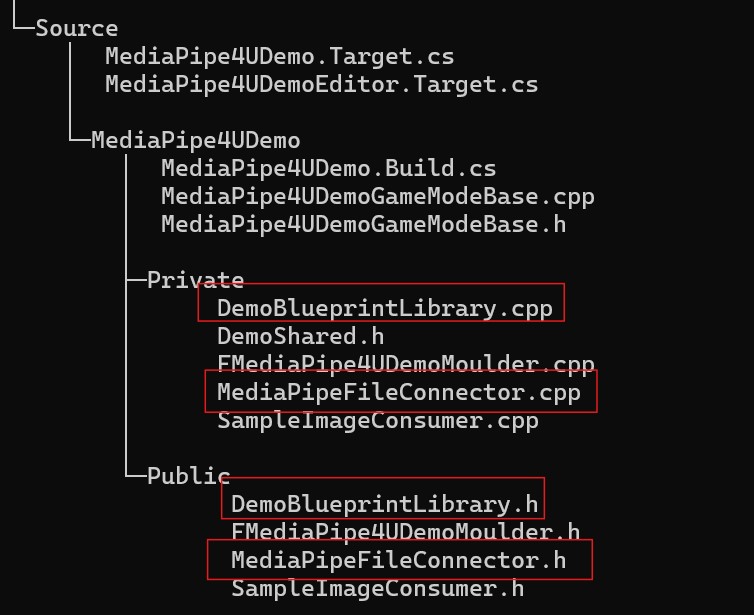
MediaPipeFileConnector.h: Connector header, sourceMediaPipeFileConnector: Connector implementation, sourceDemoBlueprintLibrary.cpp: Blueprint function-library header, sourceDemoBlueprintLibrary.cpp: Blueprint function-library implementation, source
In Blueprint, call StartMediaPipeDataFile to read a local MediaPipe data file.
The data file is in the demo-project root (view file).
MediaPipe Reference
MediaPipe 3D Coordinate System
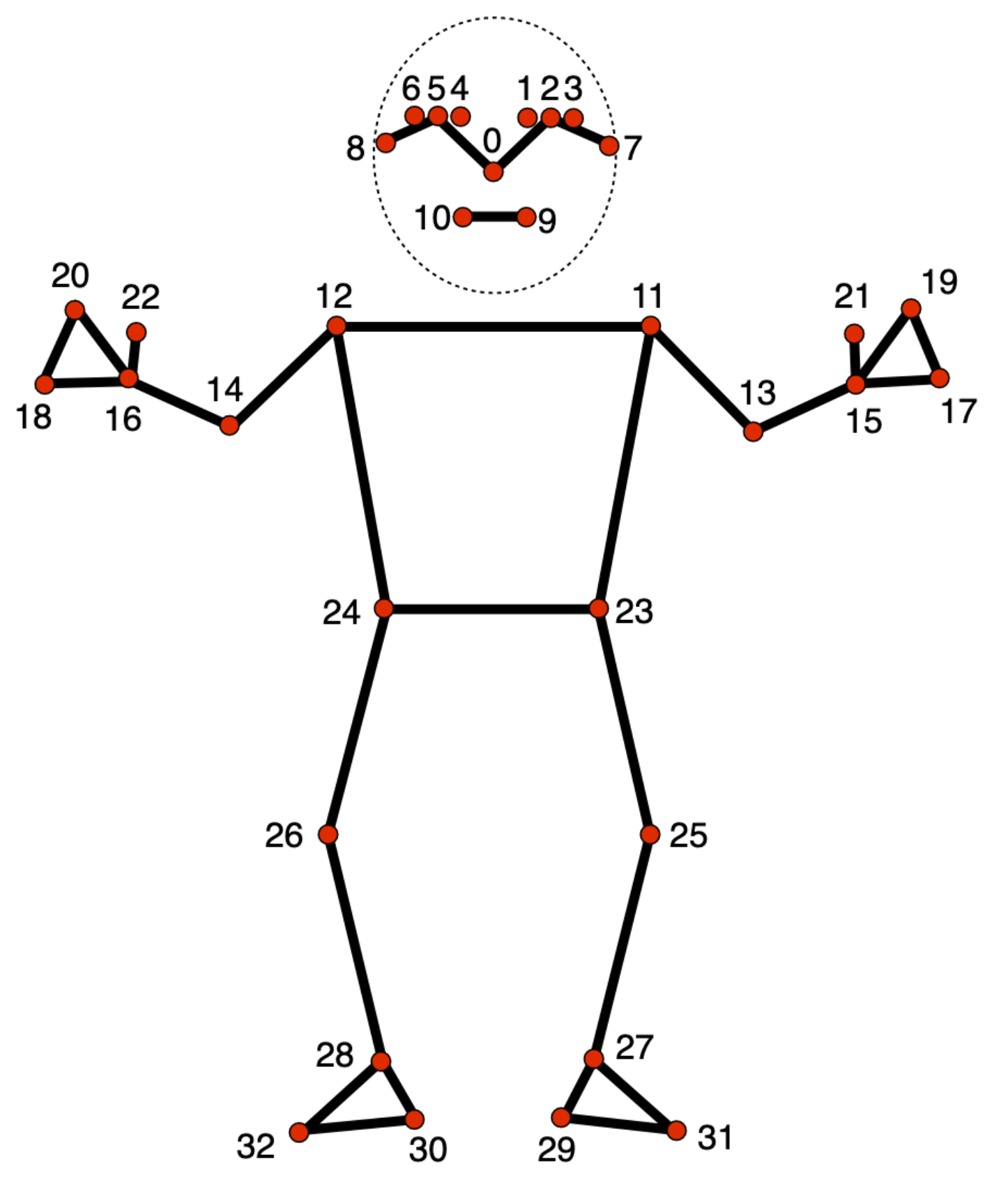
33 Body Landmarks
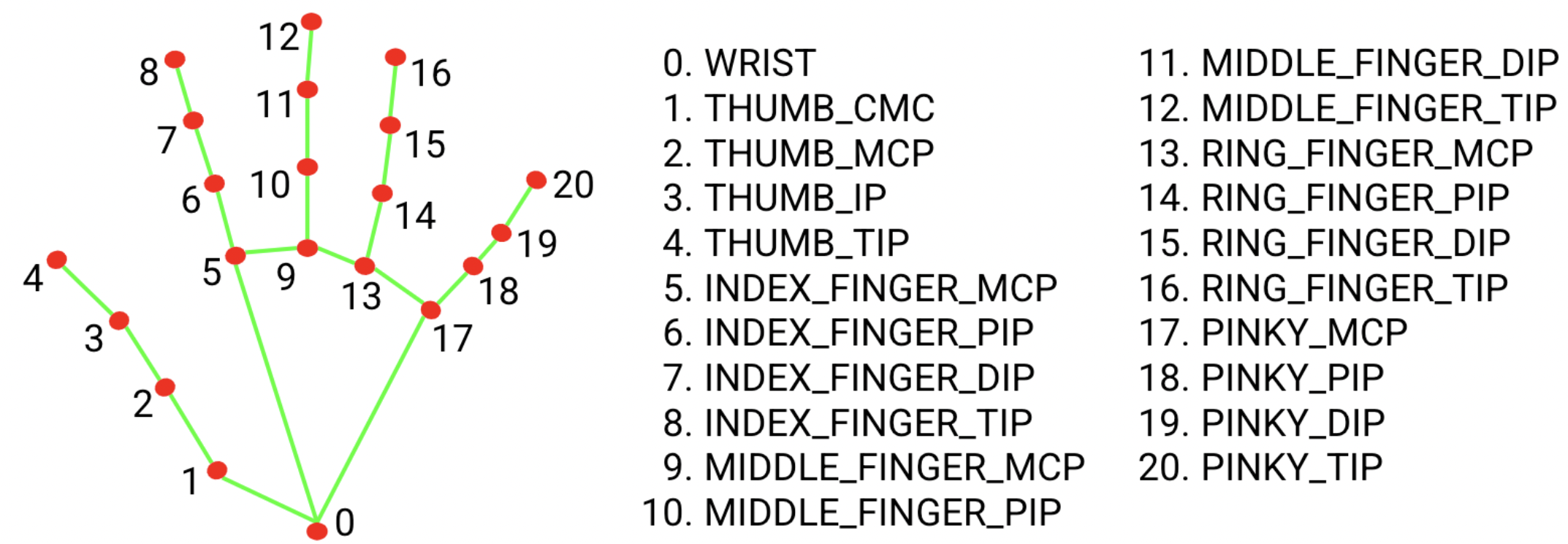
21 Hand Landmarks