Lip Sync
The MediaPipe4USpeech plugin provides real-time, offline synchronization between speech and lip animation for convincing 3D-character reading.
This document explains how to integrate lip sync with TTS.
Create a Lip-Animation Asset (PoseAsset)
MediaPipe4U supports multiple Curve Schemas and uses ARKit expressions by default. Create a PoseAsset containing curves for either schema.
Viseme expressions: 15 viseme animations.ARKit expressions: 52 ARKit expression animations.
Choosing a Curve Schema
Most digital-human and VTuber models support ARKit expressions and may already include an ARKit-compatible PoseAsset.
For better lip results, creating Viseme curves in a tool such as ZBrush may be preferable.
Create 52 expression animations matching Apple ARKit. Each expression is a BlendShape or curve in a PoseAsset.
See the Apple documentation or https://arkit-face-blendshapes.com/.
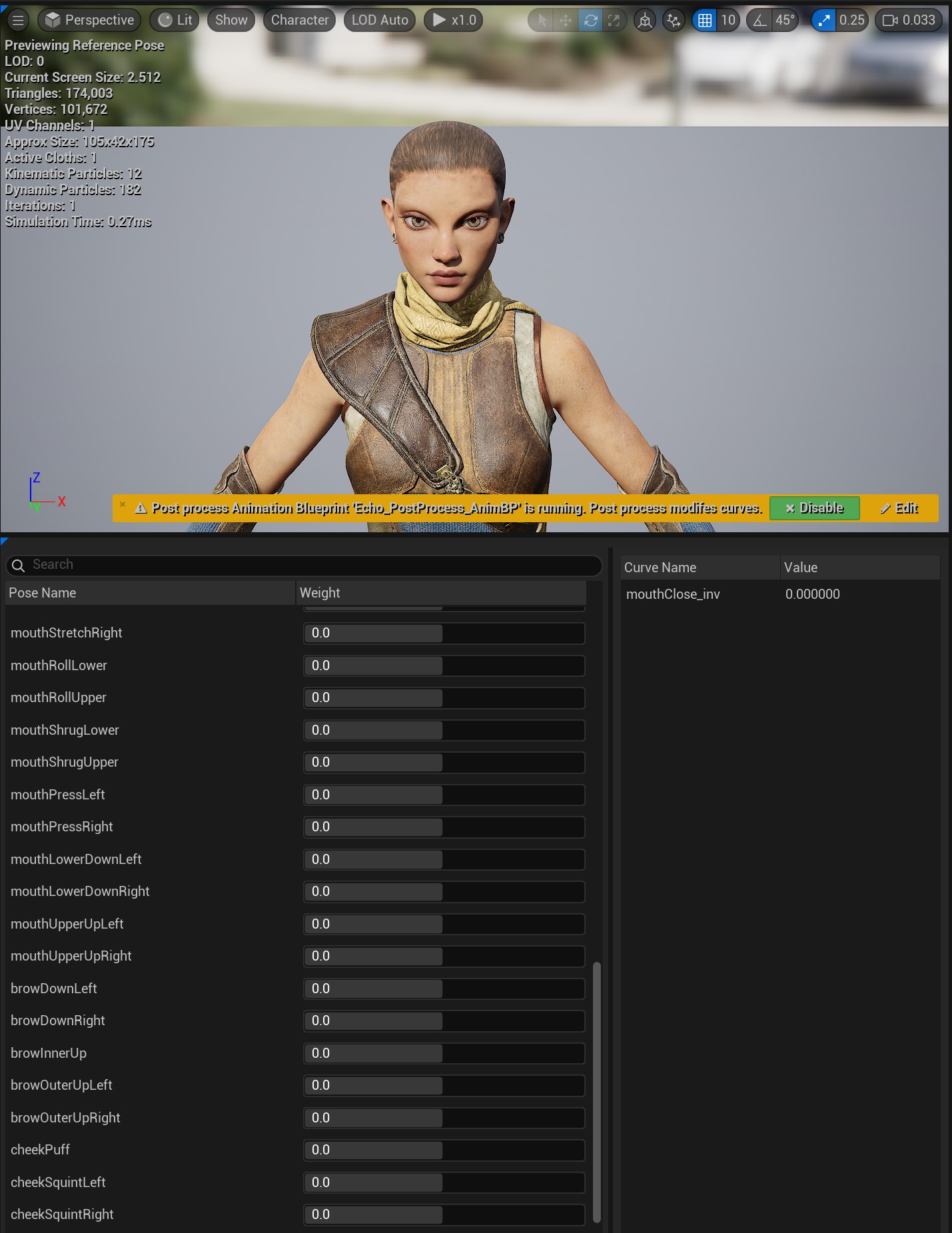
Curve or BlendShape names must follow the 52 Apple ARKit names, case-insensitively.
Create 15 lip animations matching OVRLipSync. Each is a BlendShape or PoseAsset curve.
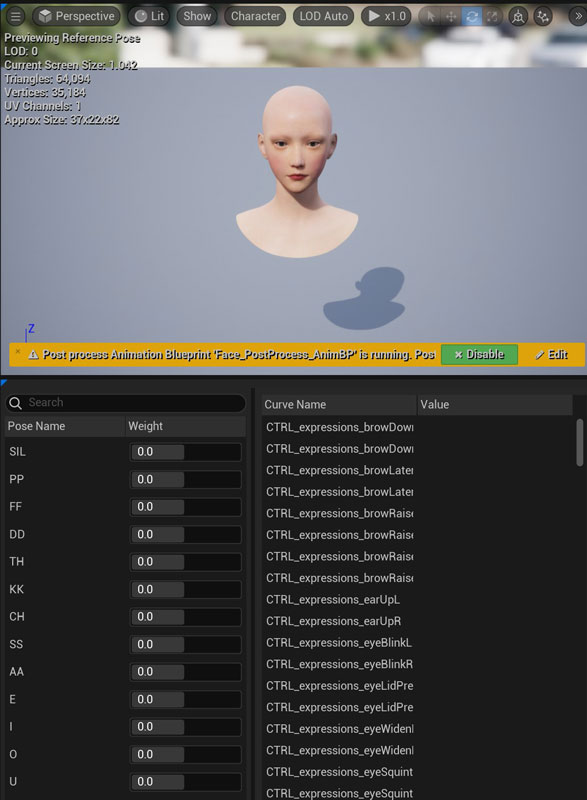
See the OVRLipSync documentation or the appendix below.
Curve or BlendShape names must be SIL, PP, FF, TH, DD, KK, CH, SS, NN, RR, AA, E, I, O, and U, case-insensitively.
MediaPipe LipSync Animation Blueprint Node
Create an Animation Blueprint and add MediaPipe LipSync. When using a PoseAsset, also add Evaluate Pose.
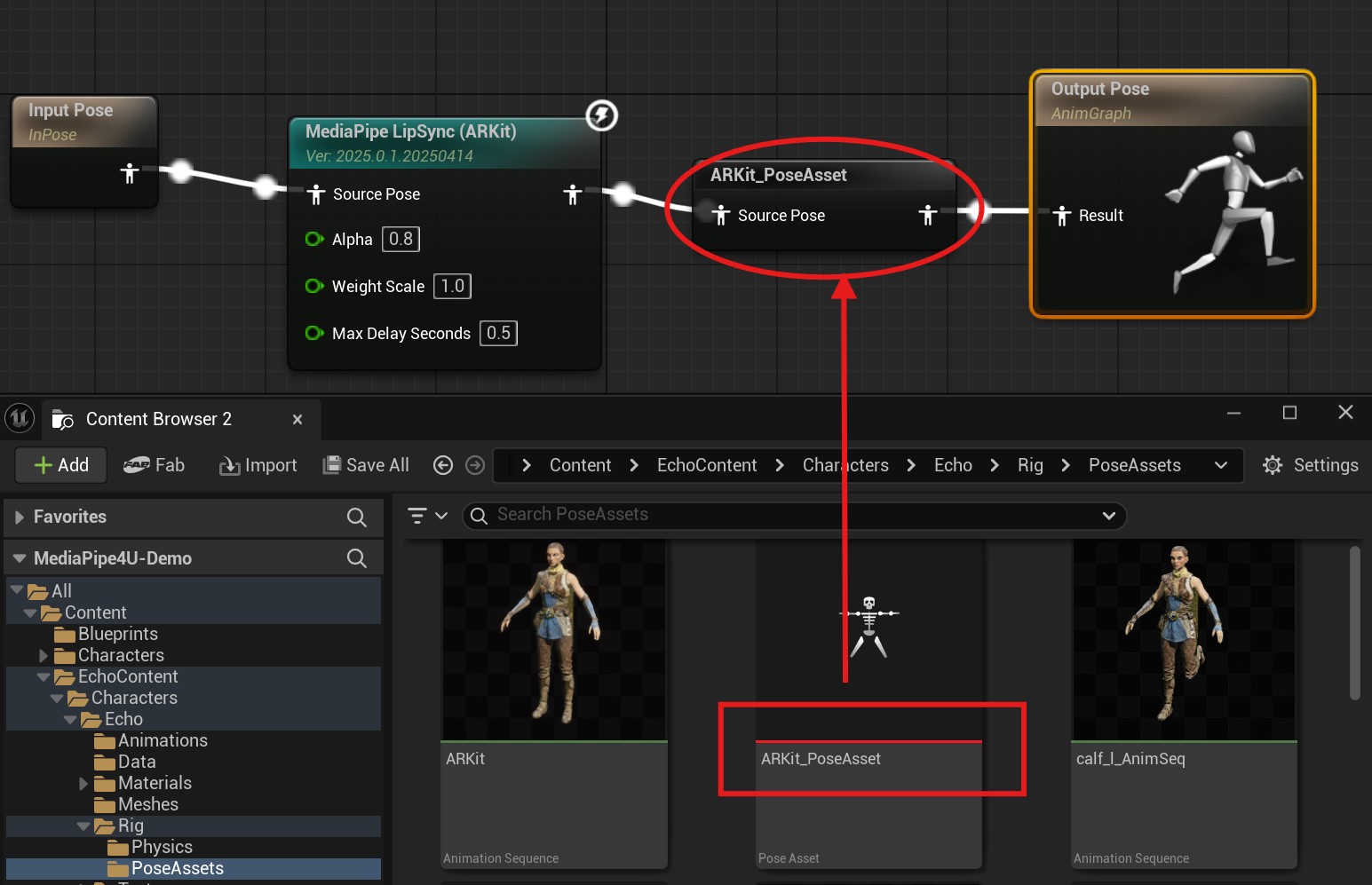
ARKit_PoseAsset in the image is an Evaluate Pose node.
LipSync Node Properties
Alpha
Controls lip-shape smoothing. Lower values produce smoother animation.
WeightScale
Scales lip animation. Higher values make mouth opening more pronounced when a voice produces weak recognition results.
MaxDelaySeconds
Speech delay in seconds. With segmented audio chunks, frames delayed beyond this value no longer produce lip animation.
 CurveSchema
Expression-animation curve schema.
OculusViseme: Requires 15 Viseme curves in the PoseAsset.ARKit: Requires 52 ARKit expression curves in the PoseAsset.
The PoseAsset type must match
CurveSolution.
Default: ARKit
ApplyMode
How lip animation is rendered.
WeightedMovingAverage: Ignores current-pose curve values and moves smoothly forward.Blend: Blends lip animation with current-pose curve values.
Default: WeightedMovingAverage
VisemeCurveRetargetAsset
Maps custom names for 15 Viseme curves to standard names. Effective only when CurveSolution is OculusViseme.
ARKitCurveRetargetAsset
Maps custom names for 52 ARKit curves to standard ARKit names. Effective only when CurveSolution is ARKit.
UseGlobalParameters
Whether to use global lip-animation parameters, allowing dynamic runtime adjustment.
Default: true
Create a Retarget Asset (Optional)
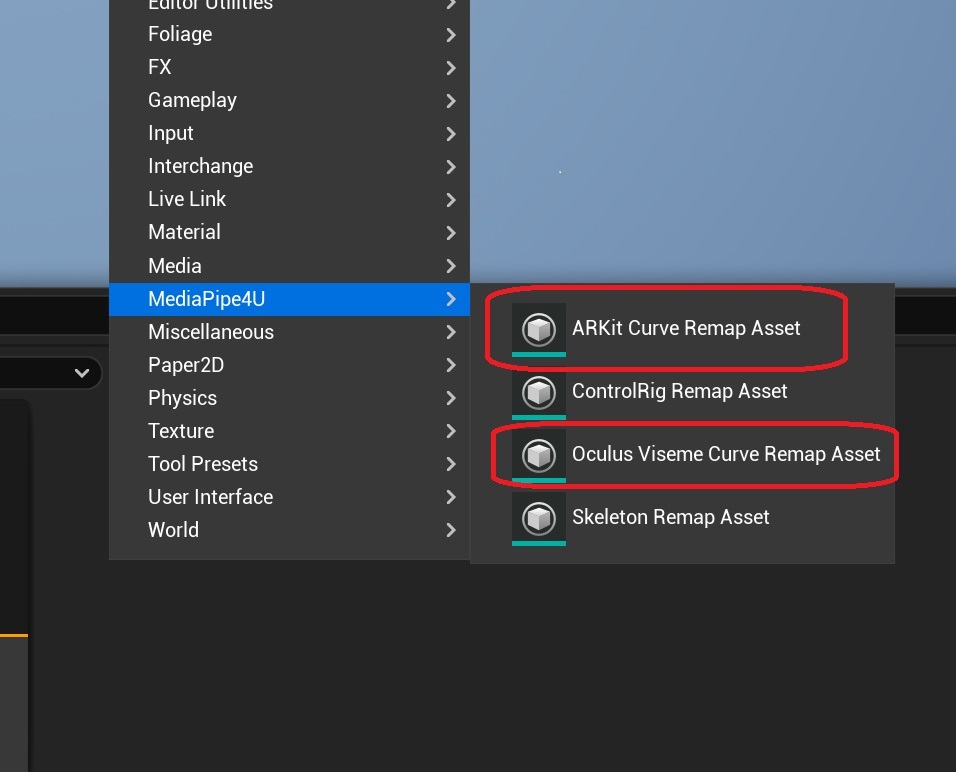
When curve names do not follow the standard, create a retarget asset and assign it to VisemeCurveRetargetAsset or ARKitCurveRetargetAsset. Right-click empty space in the Content Browser to open the asset menu:
Create a Character
- Create a
Characterand assign an Animation Blueprint containingMediaPipe LipSyncto itsMesh. - Place the
Characterin the Level. - Assign it to
LipSyncCharacteronMediaPipeSpeechActor. - Verify that
LipSyncis enabled onMediaPipeSpeechActor.
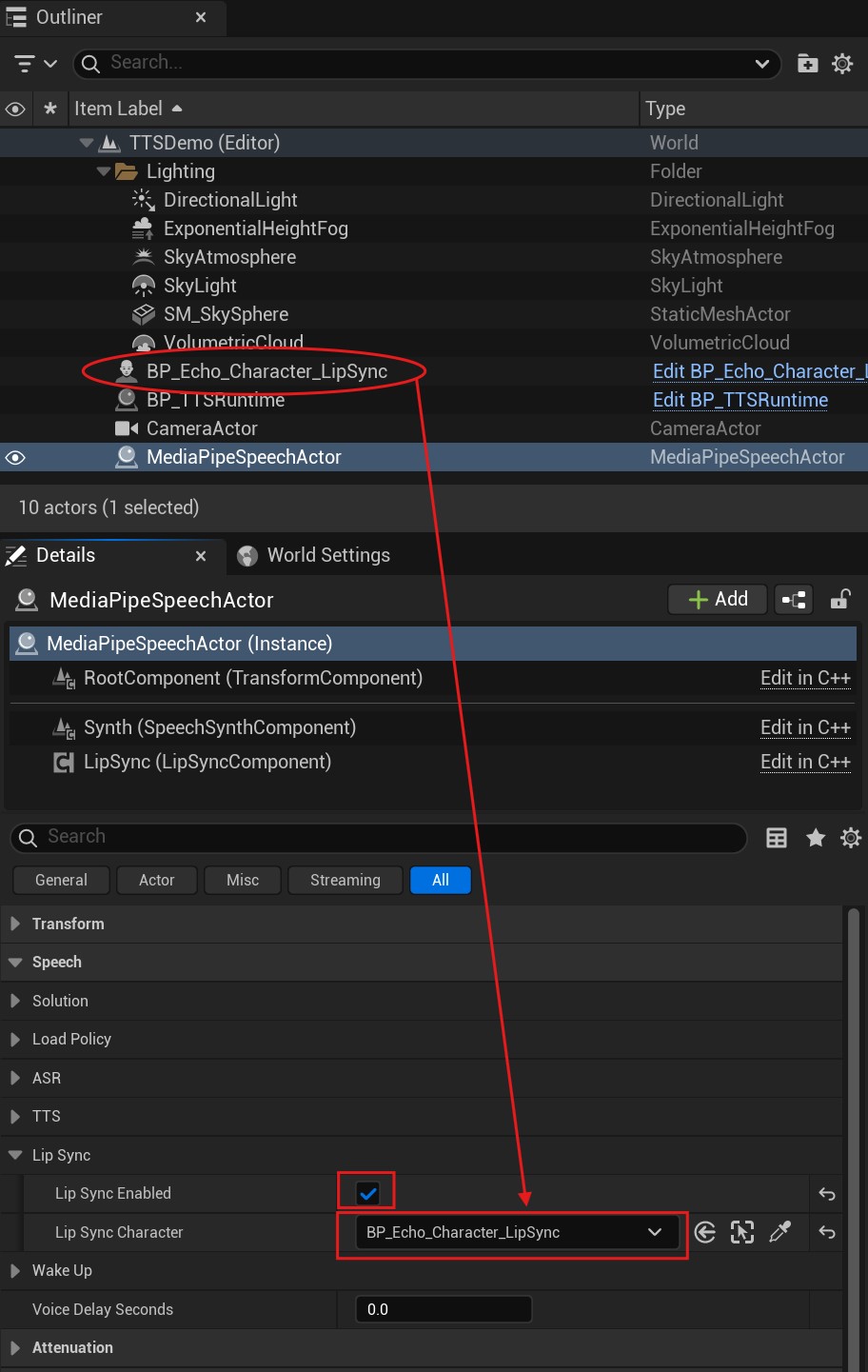
Start Lip Sync
After completing these steps, when TTS begins reading through SpeakTextAsync on MediaPipeSpeechActor, the 3D character generates matching lip animation.
Set Lip Animation at Runtime
When UseGlobalParameters is true on MediaPipe LipSync, adjust lip-animation parameters dynamically from another Blueprint.
Call SetGlobLipSyncParameters:
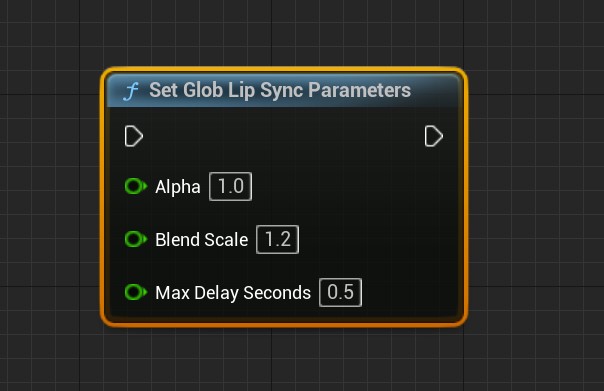
Warning
Global parameters affect every LipSync node.
When the Level contains multiple LipSync nodes, set UseGlobalParameters to false.
OvrLipSync License
MediaPipe4USpeech integrates the OVRLipSync C++ library to generate Viseme BlendShape values.
OvrLipSync
OVRLipSync includes a separate Facebook (Meta) license file. Comply with its terms.
MediaPipe4U distributes OVRLipSync libraries under section 1.1.1 of the Meta Platforms Technologies SDK License and includes the separate license file.
1.1.1 If the SDK includes any libraries, sample source code, or other materials that we make available specifically for incorporation in your Application (as indicated by applicable documentation), you may incorporate those materials and reproduce and distribute them as part of your Application, including by distributing those materials to third parties contributing to your Application.
If this interpretation is incorrect, please contact the author and the LipSync feature will be removed promptly.
Appendix
See the Facebook website for details.
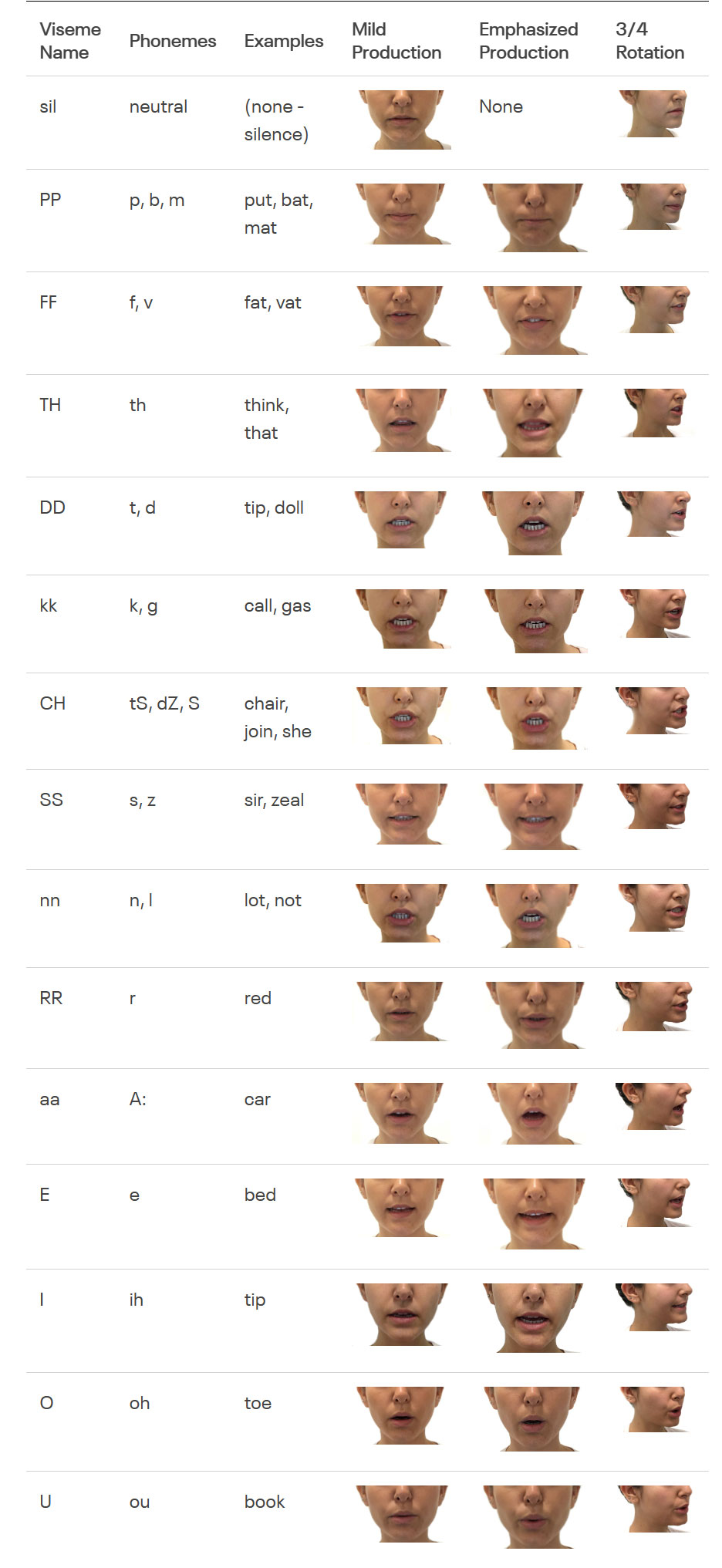
- 1: eyeBlinkLeft,
- 2: eyeLookDownLeft,
- 3: eyeLookInLeft,
- 4: eyeLookOutLeft,
- 5: eyeLookUpLeft,
- 6: eyeSquintLeft,
- 7: eyeWideLeft,
- 8: eyeBlinkRight,
- 9: eyeLookDownRight,
- 10: eyeLookInRight,
- 11: eyeLookOutRight,
- 12: eyeLookUpRight,
- 13: eyeSquintRight,
- 14: eyeWideRight,
- 15: jawForward,
- 16: jawLeft,
- 17: jawRight,
- 18: jawOpen,
- 19: mouthClose,
- 20: mouthFunnel,
- 21: mouthPucker,
- 22: mouthRight,
- 23: mouthLeft,
- 24: mouthSmileLeft,
- 25: mouthSmileRight,
- 26: mouthFrownRight,
- 27: mouthFrownLeft,
- 28: mouthDimpleLeft,
- 29: mouthDimpleRight,
- 30: mouthStretchLeft,
- 31: mouthStretchRight,
- 32: mouthRollLower,
- 33: mouthRollUpper,
- 34: mouthShrugLower,
- 35: mouthShrugUpper,
- 36: mouthPressLeft,
- 37: mouthPressRight,
- 38: mouthLowerDownLeft,
- 39: mouthLowerDownRight,
- 40: mouthUpperUpLeft,
- 41: mouthUpperUpRight,
- 42: browDownLeft,
- 43: browDownRight,
- 44: browInnerUp,
- 45: browOuterUpLeft,
- 46: browOuterUpRight,
- 47: cheekPuff,
- 48: cheekSquintLeft,
- 49: cheekSquintRight,
- 50: noseSneerLeft,
- 51: noseSneerRight,
- 52: tongueOut