Install Speech Models
Because speech model packages are very large, they are not included with the plugin and must be downloaded separately. Download links are available on the speech model package releases page.
Tip
Different languages use different model packages. Select the correct language when downloading.
For example, Chinese characters cannot be recognized when using an English model package.
zh_enorzh_mixin a model-package filename indicates a primarily Chinese model that supports mixed Chinese and English.
After a model package is installed in the development environment, its model files are automatically included when packaging the project. Model packages are very large (1 GB). To exclude them from the packaged application, manually modify the Speech plugin's Build.cs file.
Installation Steps
Install a speech model package through UE Editor or by manually copying its folders.
Speech model releases page:
https://huggingface.co/endink/M4U-Speech-Models
Install in Unreal Editor
This is the easiest way to install a speech package and is recommended.
- Download a model package (usually a .zip archive) from the speech model releases page.
- Open UE Editor and select
Edit >> Project Settingsto open Project Settings. - In the left pane, select
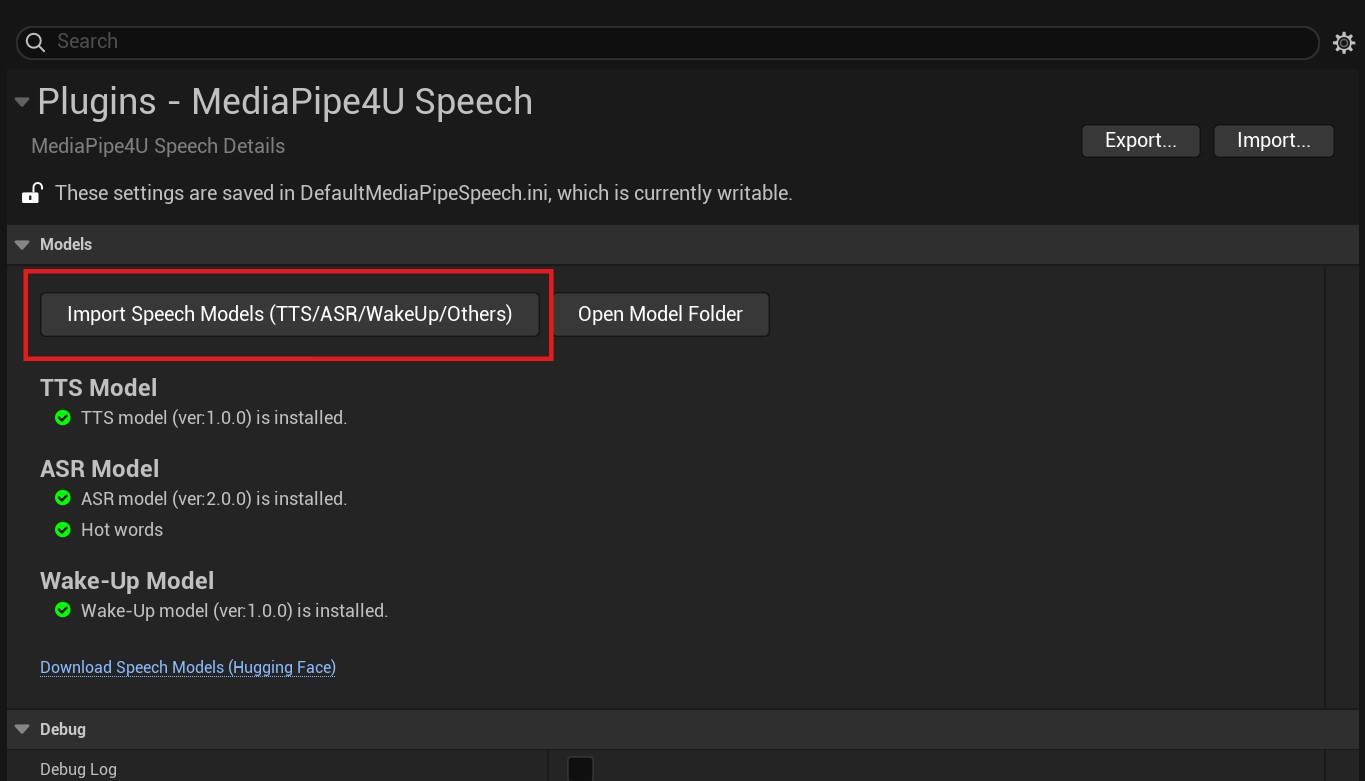
Plugins >> MediaPipe4U Speechto open the MediaPipe4U Speech settings page. - On the MediaPipe4U Speech settings page, click
Import Speech Modelsand select the downloaded .zip file to install the model package.
Tip
The MediaPipe4U Speech settings page also shows model-package status, but this only performs a basic check for the model-package folder.
When no model package is installed, the status indicator is red and displays a message.
Click Download Speech Models on the MediaPipe4U Speech settings page to quickly open the model download page.
Manual Installation
Install manually by extracting the downloaded model-package .zip file.
- Download a model package (usually a .zip archive) from the speech model releases page.
- Extract the model package.
- Copy the extracted contents to
[Plugins Folder]\MediaPipe4USpeech\Source\ThirdParty\SpeechAPI\Data.
After successful installation, the directory structure looks like this:
[Plugins Folder]\MediaPipe4USpeech\Source\ThirdParty\SpeechAPI\Data
├─asr
│  ├─fsmn_vad_model
│  ├─paraformer_model
│  └─punc_model
└─tts
    ├─dict
    │  ├─fastspeech2_nosil_baker_ckpt_0.4
    │  ├─jieba
    │  │  └─pos_dict
    │  ├─speedyspeech_nosil_baker_ckpt_0.5
    │  └─tranditional_to_simplified
    ├─models
    └─speech
        ├─dict
        └─models
Plugins Folderis your project's Plugins directory.
Model Packages
- Files beginning with
ttsare TTS (speech synthesis) model files. - Files beginning with
asrare ASR (speech recognition) model files. - Files beginning with
wakeupare voice wake-up model files.