Offline Speech Synthesis (TTS)
MediaPipe4USpeech provides offline, real-time text-to-speech, converting text into PCM audio data for playback in Unreal Engine.
Usage
- Install a TTS model.
- Add a
MediaPipeSpeechActorcomponent to the scene. - Configure TTS in the Details panel.
- Call
SpeakTextorSpeakTextAsynconMediaPipeSpeechActorto read text.
To install a TTS model, read Installing Speech Models.
Properties
MediaPipeSpeechActor provides many TTS properties:
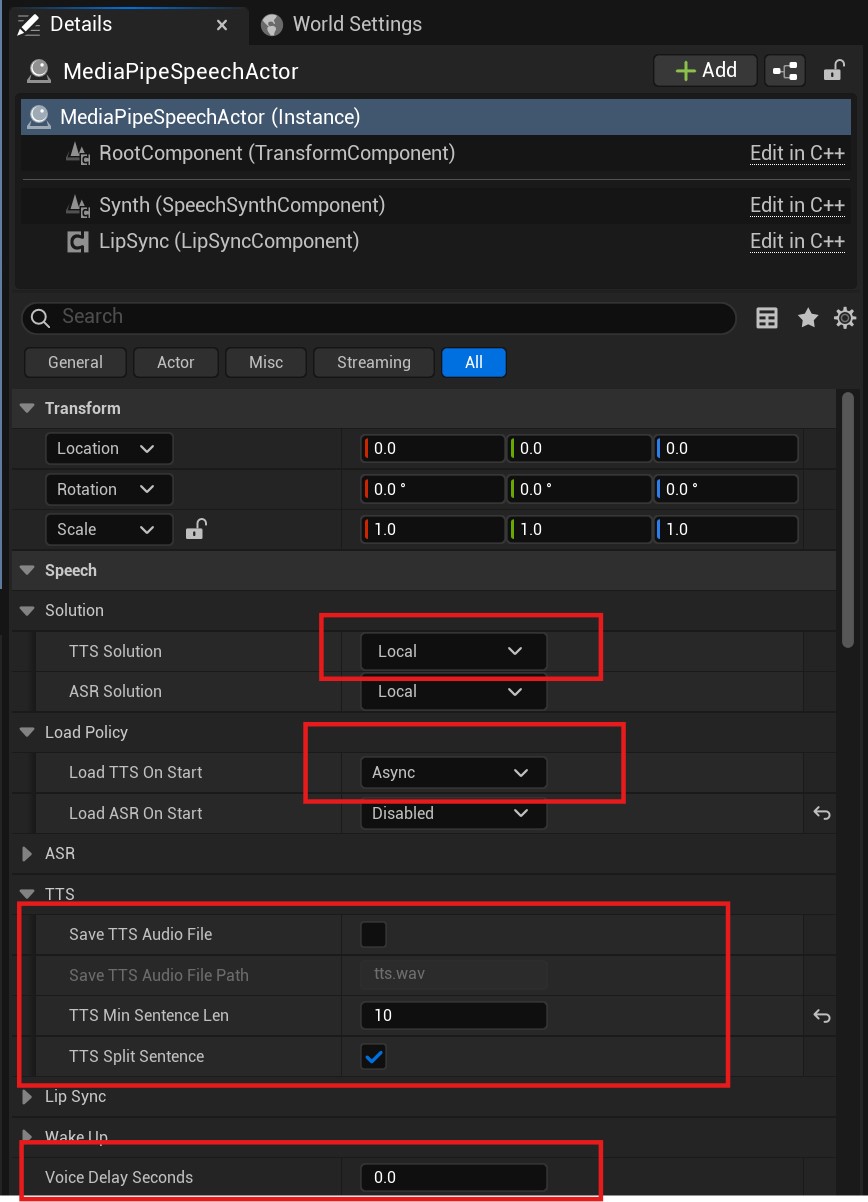
TTSSolutino
The solution used for TTS. Normally, use Local for offline TTS.
LoadTTSOnStart
How TTS (the model) is loaded when the application starts.
Disabled: Do not load the TTS model at startup.Async: Load the model asynchronously on a thread-pool thread.Async: Load the model synchronously on the game thread.
Tip
With asynchronous loading (Async), use OnTTSLoaded to receive notification when the TTS model finishes loading.
SaveTTSAudioFile Whether to save audio as a .wav file, normally for debugging.
SaveTTSAudioFilePath
When SaveAudioFile is true, controls the audio-file save path.
The path can be absolute or relative; relative paths are rooted at Saved/M4UAudio.
Events
OnTTSLoaded
Called when TTS loading finishes.
OnTTSCompleted
Triggered when the TTS model finishes text-to-speech inference. Audio data has been produced, but playback may not yet be complete.
OnTTSWaveReceived
Triggered when the audio playback component receives the inferred audio data.
OnSpeakingCompleted
Triggered when reading finishes and the last audio chunk has played.
OnSpeakingChunkStarted
Triggered when TTS starts reading an audio chunk.
OnSpeakingChunkCompleted
Triggered when TTS finishes reading an audio chunk.
Tip
TTS automatically splits long text and performs inference by segment, producing one audio chunk per segment for simultaneous inference and playback.
Functions
| Function | Description |
|---|---|
| ListSpeakers | Lists speakers when the TTS model supports multiple speakers. Returns an empty array if TTS has not loaded. |
| GetSpeakerId | Gets the current speaker ID. Returns -1 if TTS has not loaded. |
| IsTTSLoading | Indicates whether TTS is loading. |
| IsTTSReady | Indicates whether TTS is ready (loading completed successfully). |
| SetSpeakerId | Sets the speaker by ID. Obtain IDs from ListSpeakers. |
| IsSpeaking | Indicates whether TTS is speaking. |
| IsSpeakStopping | Indicates whether TTS is stopping speech. |
| GetTTSState | Gets the TTS model loading state. |
| SpeakText | Reads text.StopPrevious indicates whether to interrupt current speech. |
| StopText | Stops reading. |
Async Functions
| Function | Description |
|---|---|
| LoadTTSAsync | When LoadTTSOnStart is Disabled, TTS is not loaded automatically; use this function to load it manually. |
| SpeakTextAsync | Reads text.StopPrevious indicates whether to interrupt current speech. |
| StopTextAsync | Stops reading. |
Blueprint Function Library
ListTTSSolutions: Lists currently available TTS solutions.